

Legacy System Modernization: How to Upgrade Without Ripping Everything Out
Digital Transformation Doesn't Mean Starting From Scratch
Here's something most vendors won't tell you: legacy system modernization doesn't require blowing up what already works. You can modernize around your existing systems — keeping the data, workflows, and business logic that took years to get right — while still moving your technology forward.
That's the whole idea behind this guide. Full replacement sounds tempting when your software feels old and clunky. It's rarely the smartest move, though. At AzurixLab , we've helped businesses modernize legacy applications, integrate APIs, migrate to the cloud, and layer in automation and AI — all without tearing out the systems that keep daily operations running.
Below, we'll get into what legacy systems actually are, why rip-and-replace projects tend to backfire, and what a smarter, incremental modernization path looks like in practice.
What Are Legacy Systems, and Why Do Businesses Hesitate to Replace Them?
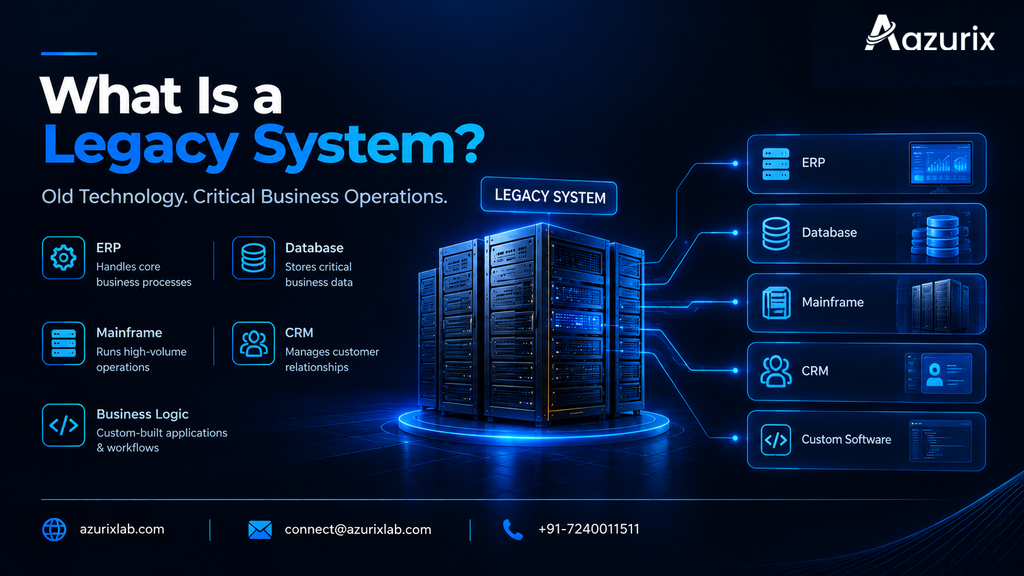
Legacy systems are older software platforms still doing real work inside a business, even though the tech behind them is dated. Aging ERP installations. On-premises databases. Mainframe applications running finance or logistics. A custom-built CRM someone coded a decade ago and never fully documented. If it's still running critical operations but hasn't kept pace, it's legacy.
So why don't companies just swap these out? A few reasons keep coming up:
- The switching cost is high — new licenses, new infrastructure, new training, all at once.
- Operational risk is real. Nobody wants to be the person who broke order processing during a migration.
- Data migration is scary, especially when records span years and multiple system versions.
- Staff know the old system's quirks by heart; retraining takes time and slows everyone down.
- Business logic gets buried inside old code over the years, and nobody's quite sure what breaks if you remove it.
Picture a mid-size manufacturer running a 15-year-old inventory system. It's ugly, it's slow, but it works — and three employees know exactly how to make it sing. Nobody wants to touch it, because everyone remembers the last "upgrade" that took the warehouse offline for two days.
The Problem With Rip-and-Replace Strategies
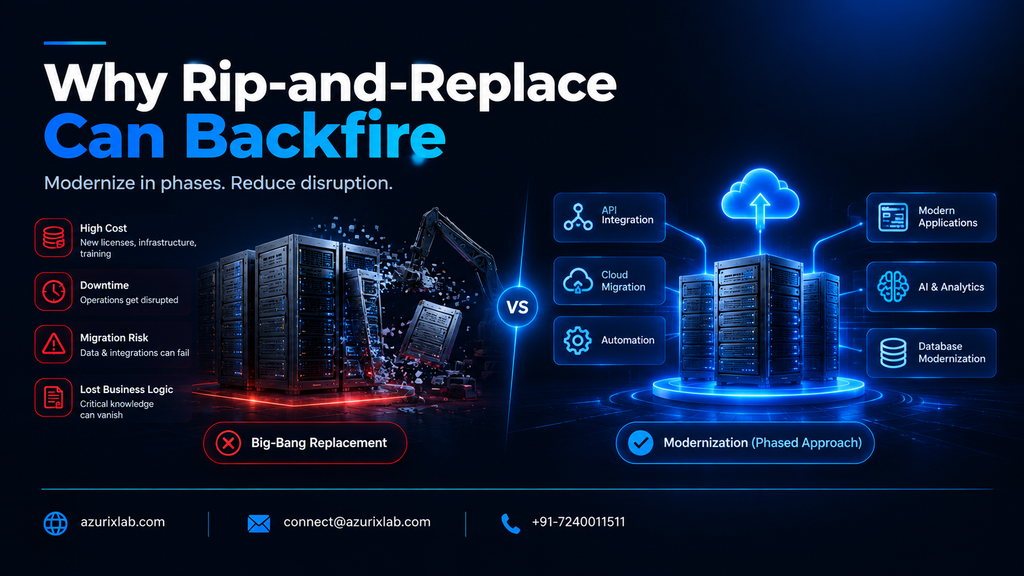
Full system replacements carry more risk than most businesses expect, and that risk usually shows up as cost overruns, missed deadlines, and disrupted operations. Replatforming an entire ERP or CRM in one shot means months (sometimes years) of implementation, a big upfront budget, and a real chance day-to-day operations get knocked sideways mid-project.
There's also something harder to quantify: institutional knowledge. Old workflows, however clunky, often encode business rules that were never written down anywhere else. Replace the system, and that logic can just... vanish.
Consider a company that decides to fully replatform its order management system in one big-bang cutover. Halfway through, integrations break, staff can't process orders correctly, and the business ends up running manual workarounds for weeks while the vendor patches things. That story is common enough in IT circles that "big-bang rollout" has basically become a cautionary phrase. It's exactly why more businesses lean toward modernization instead of wholesale replacement.
What Is Legacy System Modernization? Incremental vs. Complete Modernization
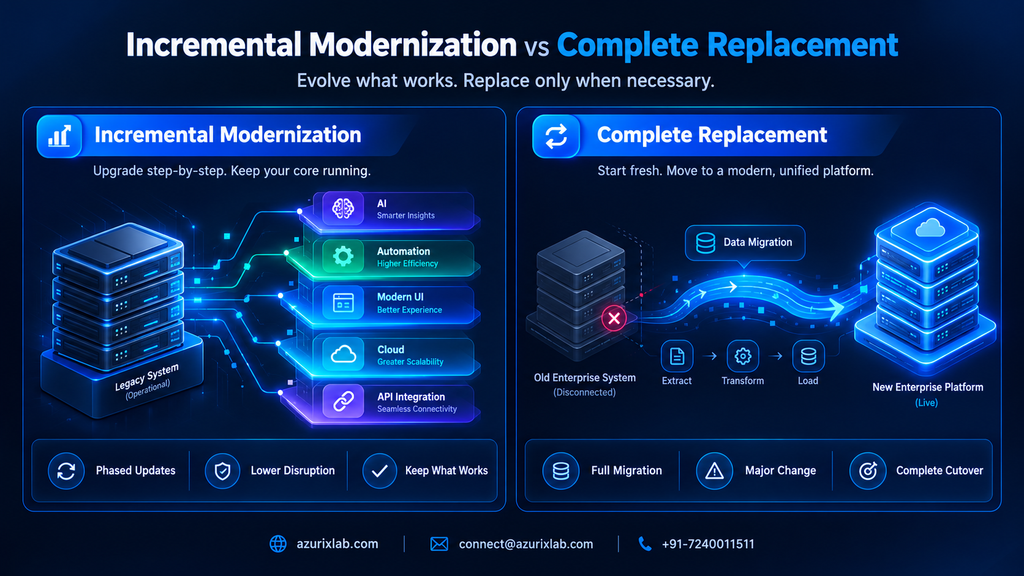
Legacy system modernization means updating, extending, or restructuring existing software so it meets current business, security, and performance needs — without necessarily throwing it away. Instead of discarding a system, you evolve it: modern interfaces, API connections, cloud pieces, automation wrapped around the manual steps.
That's different from straight-up replacement, where the old system gets decommissioned and a new one takes over completely. Modernization is generally lower-risk. You keep what's working and fix what isn't.
Two broad paths here:
- Incremental modernization — phased, module-by-module updates. You tackle one piece (say, the reporting layer) while the rest of the system stays untouched. Lower risk, spread-out cost, easier to course-correct along the way.
- Complete modernization or replacement — makes sense when the underlying platform is so outdated or unsupported that patching around it stops being worth it.
For most businesses with systems that still deliver core value, incremental is the safer bet.
Practical Modernization Approaches: API Integration, Cloud, and Database Modernization
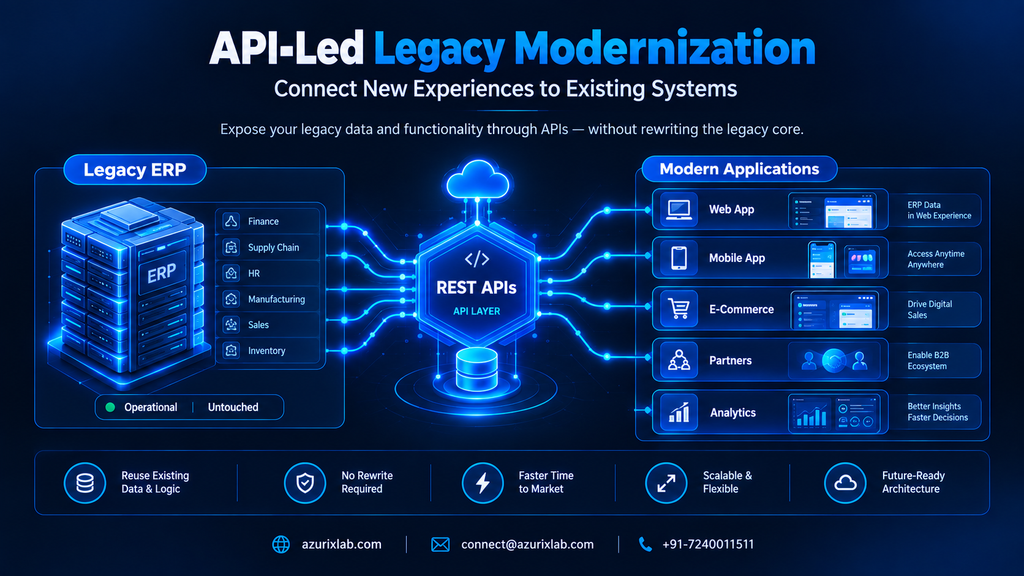
This is where legacy system modernization actually happens — and it usually starts with connectivity, not replacement.
API-led modernization and legacy system integration. Instead of rewriting an old system, you wrap it in modern APIs. New applications, mobile apps, and partner systems can then talk to the legacy core without ever touching its internals. A widely used pattern here is the "strangler fig" approach — named after the vine that grows around a tree — where new functionality gets built around a legacy system piece by piece, until the old components can eventually be retired or left running quietly in the background. Practical example: exposing a legacy ERP's order data through a REST API so a brand-new e-commerce storefront can pull inventory and pricing in real time, without anyone touching the ERP's core code.
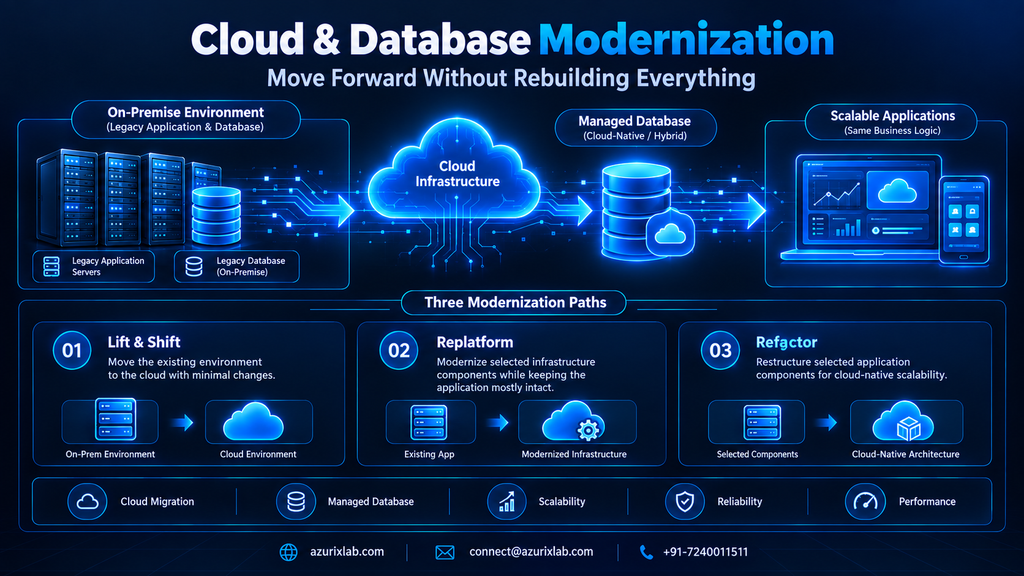
Cloud migration. There's no single way to move to the cloud, and the approach you pick actually matters:
- Lift-and-shift moves your existing setup to the cloud largely as-is — fastest, least disruptive, but it won't capture cloud-native efficiency gains.
- Replatforming makes limited adjustments (swapping the database engine, say) while keeping the application mostly intact.
- Refactoring restructures the code itself to take fuller advantage of cloud-native scalability.
A common real-world path: migrate an on-prem SQL Server database to Azure while keeping the application logic exactly as it is, then refactor pieces later once things settle.
Database modernization. Moving from an aging, hard-to-scale database to a managed cloud database (Azure SQL, PostgreSQL on a managed service, whatever fits) can improve performance and reliability without touching your core business logic at all.
Worth flagging:
- Faster integrations with partners, vendors, and new digital products
- Lower infrastructure overhead once cloud-managed services take over maintenance
- Better scalability during demand spikes, without a full rebuild
Modern Interfaces, Automation, and AI Integration Around Legacy Cores
You don't need to replace your backend to give employees and customers a modern experience. Build a modern UI or mobile app layer on top of the legacy system, and most users will never know — or care — what's running underneath.
Say a field service company relies on a decades-old scheduling system nobody wants to touch. Instead of replacing it, you build a mobile app for technicians that pulls jobs, addresses, and history straight from that old system through an API. The techs get a smooth, modern experience. The scheduling engine just keeps doing what it's always done.
Automation fits the same pattern. RPA and workflow automation tools can often handle repetitive tasks — data entry, approval routing, reconciliations — by interacting with a legacy system's existing interface or a lightweight integration layer, generally without touching the system's core code. Faster processes, no risky rebuild.
AI integration works the same way. Add a demand-forecasting model on top of your existing order history. Drop a chatbot in front of your legacy support ticketing system. The AI layer adds intelligence; the legacy system just keeps supplying the data underneath. AzurixLab has built exactly this kind of layered automation and AI integration for clients who wanted smarter operations without a system overhaul.
Security, Scalability, Cost, and Business Continuity
Modernization can meaningfully improve security and scalability without a full rebuild — but you do need to be honest about what aging systems carry with them. Older platforms may run on unsupported software versions, lack modern encryption standards, or fall short of current compliance requirements, especially once a vendor stops issuing security patches. That's a real risk for any business handling sensitive customer or financial data. Worth an honest audit rather than a guess.
On cost: there's no universal price tag for legacy system modernization. It depends on scope, how many integrations are involved, data volume, and how tangled the existing business logic is. A single API integration project looks nothing like a full cloud migration paired with database modernization, cost-wise. Scope it with a technical partner before you commit to a number.
On business continuity: the whole point of incremental modernization is avoiding disruption. Phase your rollout, test each module before it goes live, keep the legacy system running in parallel until you trust the new piece. Nobody wants a repeat of that two-day warehouse outage.
A Practical Step-by-Step Legacy Modernization Roadmap
Here's a roadmap that works for most businesses, whether you're modernizing an ERP, CRM, or a custom internal tool:
- Audit and assess your current systems — what's running, what's fragile, what's business-critical.
- Prioritize by risk and value. Fix what's costing you the most first — time, money, risk, pick your poison.
- Define your integration and API strategy — decide what needs to talk to what, and how.
- Pilot a small module using a strangler-style approach before touching anything mission-critical.
- Migrate data incrementally, checking accuracy at each stage instead of all at once.
- Modernize the UI/UX layer so users see an improvement early — that builds internal buy-in fast.
- Layer in automation and AI once the foundation feels stable.
- Monitor, test, and scale. Modernization isn't a single project — it's ongoing.
Treat this as a cycle, not a checklist you finish once and forget about.
Modernize, Replace, or Rebuild? Decision Framework and Common Mistakes to Avoid
A simple way to decide:
- Modernize when the core system still delivers real business value and is reasonably stable — just outdated around the edges.
- Replace when the platform is fundamentally incompatible with where the business is heading (wrong architecture, no vendor support, can't integrate at all).
- Rebuild when the technology itself is obsolete beyond reasonable repair.
- Retire when the function it serves simply isn't needed anymore.
Mistakes we see businesses make, again and again:
- Modernizing everything at once instead of prioritizing by impact
- Ignoring data quality issues before migration (garbage in, garbage out — still true, always will be)
- Skipping buy-in from the people who actually use the system every day
- Underestimating how tangled the integrations really are
- Treating modernization like a one-time project instead of a continuous process
FAQ: Legacy System Modernization Questions Answered
It's the process of updating, extending, or restructuring existing software — rather than fully replacing it — so it meets current performance, security, and integration needs.
Mostly cost, operational risk, data migration fears, staff retraining needs, and the business logic buried in old workflows that's hard to replicate anywhere else.
Modernization evolves the existing system incrementally; replacement decommissions it entirely and swaps in something new, usually at higher cost and risk.
Phased approach — pilot small modules, run new and old systems in parallel, migrate data incrementally, test thoroughly before full cutover.
Exposing an old ERP through APIs, migrating an on-prem database to the cloud, adding a modern mobile app on top of a legacy backend, layering automation and AI onto existing workflows.
It varies a lot based on scope, integration complexity, and data volume — there's no fixed number, which is exactly why proper scoping with a technical partner matters.
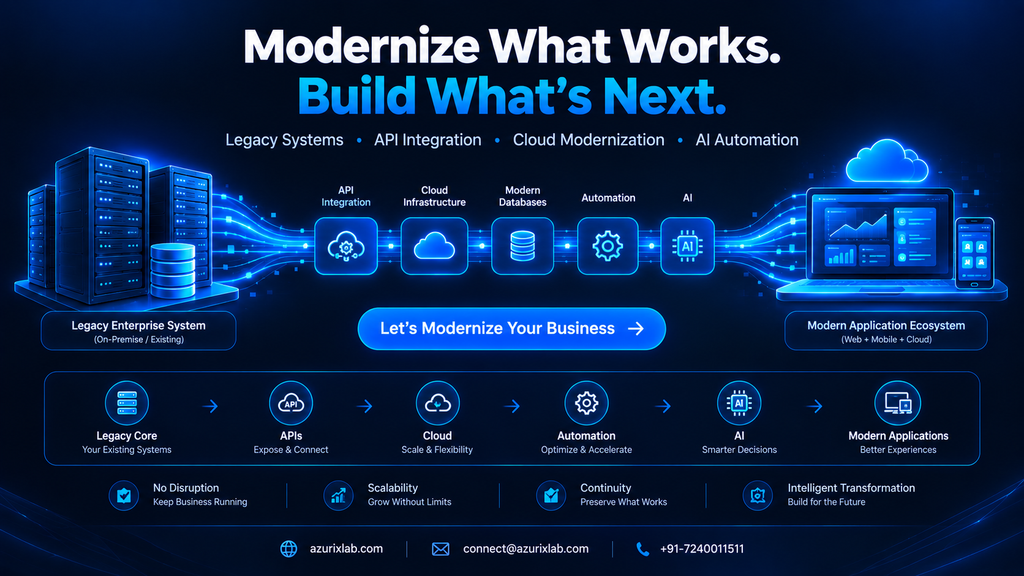
If your business is sitting on legacy software that still works but feels stuck in the past, you don't have to choose between "live with it" and "rip it all out." AzurixLab helps businesses modernize legacy systems through API integration, cloud and database modernization, custom software development, and AI-powered automation — all built around what you already have. Reach out and let's talk through your systems, and figure out the smartest path forward together.