Digital Transformation Doesn't Mean Starting From Scratch
Here's something most vendors won't tell you: legacy system modernization doesn't require blowing up what already works. You can modernize around your existing systems — keeping the data, workflows, and business logic that took years to get right — while still moving your technology forward.
That's the whole idea behind this guide. Full replacement sounds tempting when your software feels old and clunky. It's rarely the smartest move, though. At AzurixLab , we've helped businesses modernize legacy applications, integrate APIs, migrate to the cloud, and layer in automation and AI — all without tearing out the systems that keep daily operations running.
Below, we'll get into what legacy systems actually are, why rip-and-replace projects tend to backfire, and what a smarter, incremental modernization path looks like in practice.
What Are Legacy Systems, and Why Do Businesses Hesitate to Replace Them?
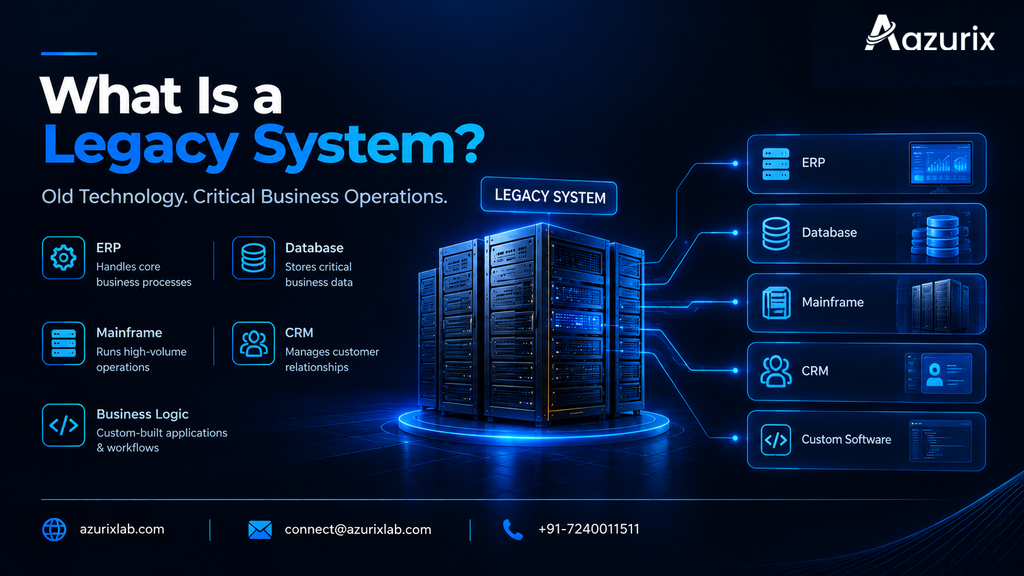
Legacy systems are older software platforms still doing real work inside a business, even though the tech behind them is dated. Aging ERP installations. On-premises databases. Mainframe applications running finance or logistics. A custom-built CRM someone coded a decade ago and never fully documented. If it's still running critical operations but hasn't kept pace, it's legacy.
So why don't companies just swap these out? A few reasons keep coming up:
The switching cost is high — new licenses, new infrastructure, new training, all at once.
Operational risk is real. Nobody wants to be the person who broke order processing during a migration.
Data migration is scary, especially when records span years and multiple system versions.
Staff know the old system's quirks by heart; retraining takes time and slows everyone down.
Business logic gets buried inside old code over the years, and nobody's quite sure what breaks if you remove it.
Picture a mid-size manufacturer running a 15-year-old inventory system. It's ugly, it's slow, but it works — and three employees know exactly how to make it sing. Nobody wants to touch it, because everyone remembers the last "upgrade" that took the warehouse offline for two days.
The Problem With Rip-and-Replace Strategies
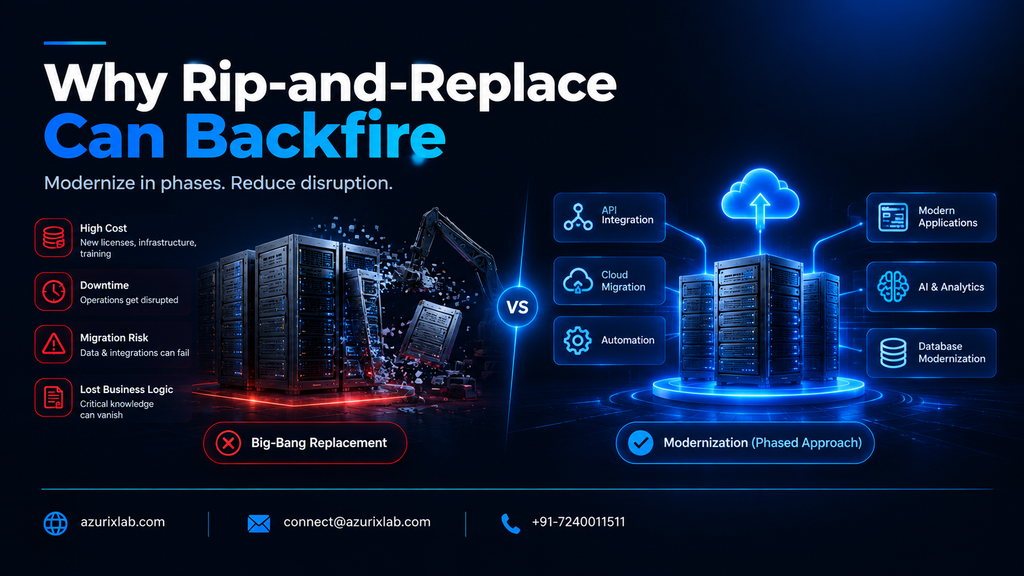
Full system replacements carry more risk than most businesses expect, and that risk usually shows up as cost overruns, missed deadlines, and disrupted operations. Replatforming an entire ERP or CRM in one shot means months (sometimes years) of implementation, a big upfront budget, and a real chance day-to-day operations get knocked sideways mid-project.
There's also something harder to quantify: institutional knowledge. Old workflows, however clunky, often encode business rules that were never written down anywhere else. Replace the system, and that logic can just... vanish.
Consider a company that decides to fully replatform its order management system in one big-bang cutover. Halfway through, integrations break, staff can't process orders correctly, and the business ends up running manual workarounds for weeks while the vendor patches things. That story is common enough in IT circles that "big-bang rollout" has basically become a cautionary phrase. It's exactly why more businesses lean toward modernization instead of wholesale replacement.
What Is Legacy System Modernization? Incremental vs. Complete Modernization
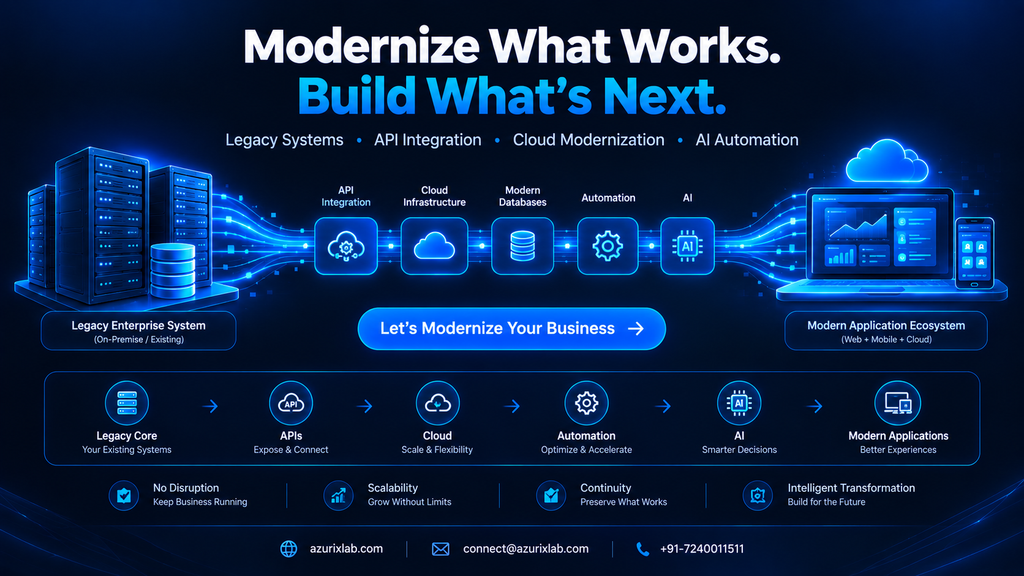
Legacy system modernization means updating, extending, or restructuring existing software so it meets current business, security, and performance needs — without necessarily throwing it away. Instead of discarding a system, you evolve it: modern interfaces, API connections, cloud pieces, automation wrapped around the manual steps.
That's different from straight-up replacement, where the old system gets decommissioned and a new one takes over completely. Modernization is generally lower-risk. You keep what's working and fix what isn't.
Two broad paths here:
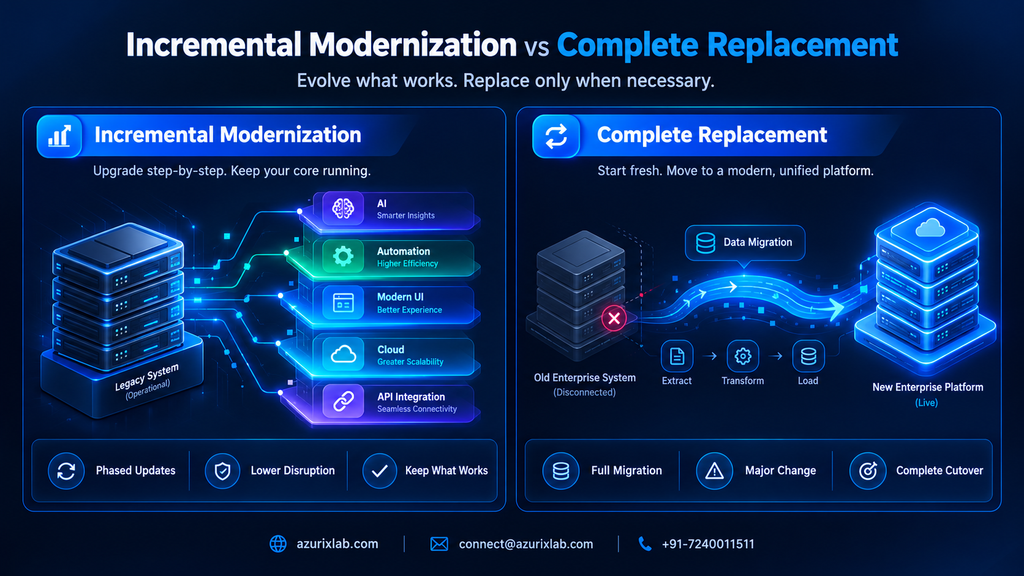
Incremental modernization — phased, module-by-module updates. You tackle one piece (say, the reporting layer) while the rest of the system stays untouched. Lower risk, spread-out cost, easier to course-correct along the way.
Complete modernization or replacement — makes sense when the underlying platform is so outdated or unsupported that patching around it stops being worth it.
For most businesses with systems that still deliver core value, incremental is the safer bet.
Practical Modernization Approaches: API Integration, Cloud, and Database Modernization
This is where legacy system modernization actually happens — and it usually starts with connectivity, not replacement.
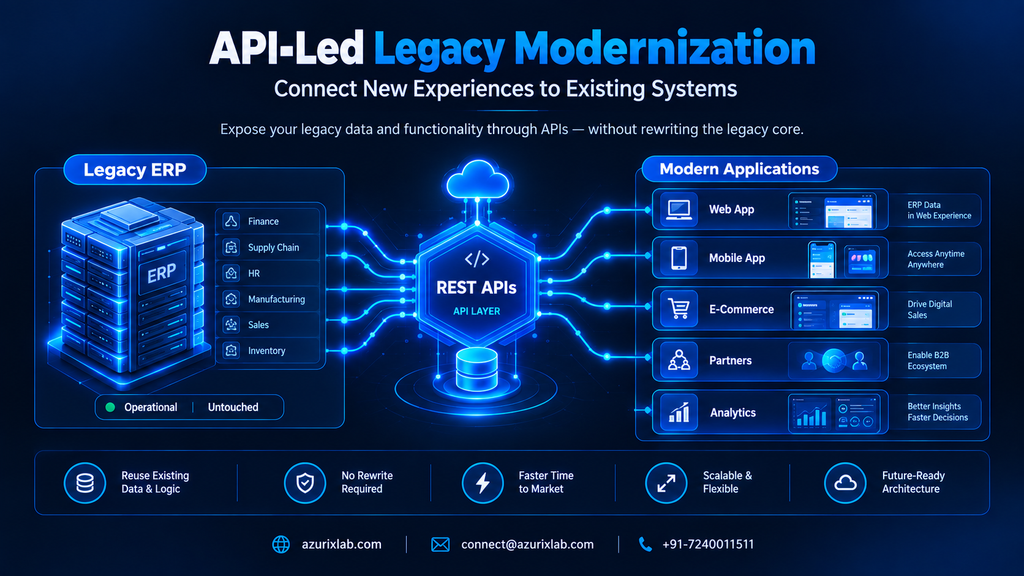
API-led modernization and legacy system integration. Instead of rewriting an old system, you wrap it in modern APIs. New applications, mobile apps, and partner systems can then talk to the legacy core without ever touching its internals. A widely used pattern here is the "strangler fig" approach — named after the vine that grows around a tree — where new functionality gets built around a legacy system piece by piece, until the old components can eventually be retired or left running quietly in the background. Practical example: exposing a legacy ERP's order data through a REST API so a brand-new e-commerce storefront can pull inventory and pricing in real time, without anyone touching the ERP's core code.
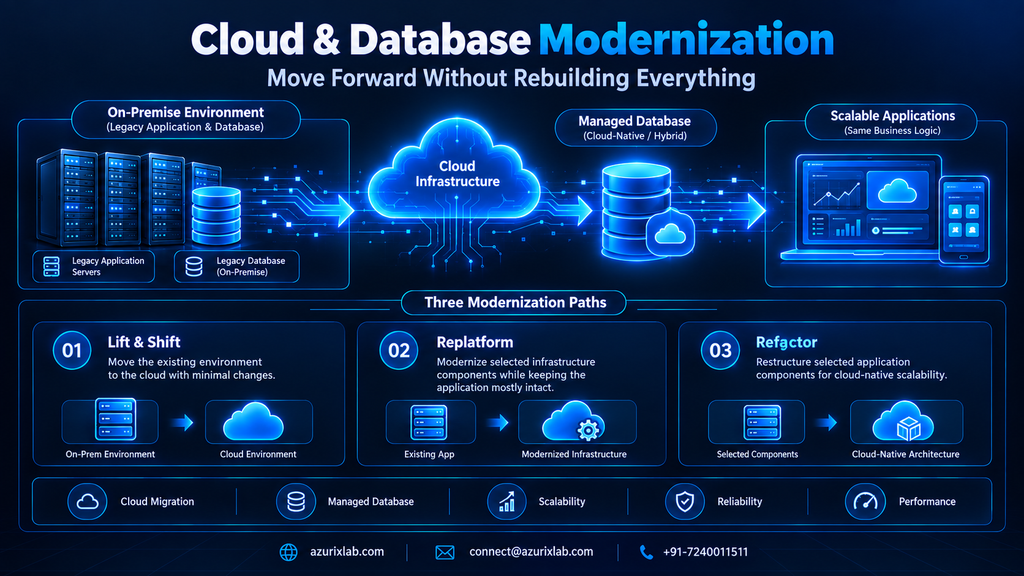
Cloud migration. There's no single way to move to the cloud, and the approach you pick actually matters:
Lift-and-shift moves your existing setup to the cloud largely as-is — fastest, least disruptive, but it won't capture cloud-native efficiency gains.
Replatforming makes limited adjustments (swapping the database engine, say) while keeping the application mostly intact.
Refactoring restructures the code itself to take fuller advantage of cloud-native scalability.
A common real-world path: migrate an on-prem SQL Server database to Azure while keeping the application logic exactly as it is, then refactor pieces later once things settle.
Database modernization. Moving from an aging, hard-to-scale database to a managed cloud database (Azure SQL, PostgreSQL on a managed service, whatever fits) can improve performance and reliability without touching your core business logic at all.
Worth flagging:
Faster integrations with partners, vendors, and new digital products
Lower infrastructure overhead once cloud-managed services take over maintenance
Better scalability during demand spikes, without a full rebuild
Modern Interfaces, Automation, and AI Integration Around Legacy Cores
You don't need to replace your backend to give employees and customers a modern experience. Build a modern UI or mobile app layer on top of the legacy system, and most users will never know — or care — what's running underneath.
Say a field service company relies on a decades-old scheduling system nobody wants to touch. Instead of replacing it, you build a mobile app for technicians that pulls jobs, addresses, and history straight from that old system through an API. The techs get a smooth, modern experience. The scheduling engine just keeps doing what it's always done.
Automation fits the same pattern. RPA and workflow automation tools can often handle repetitive tasks — data entry, approval routing, reconciliations — by interacting with a legacy system's existing interface or a lightweight integration layer, generally without touching the system's core code. Faster processes, no risky rebuild.
AI integration works the same way. Add a demand-forecasting model on top of your existing order history. Drop a chatbot in front of your legacy support ticketing system. The AI layer adds intelligence; the legacy system just keeps supplying the data underneath. AzurixLab has built exactly this kind of layered automation and AI integration for clients who wanted smarter operations without a system overhaul.
Security, Scalability, Cost, and Business Continuity
Modernization can meaningfully improve security and scalability without a full rebuild — but you do need to be honest about what aging systems carry with them. Older platforms may run on unsupported software versions, lack modern encryption standards, or fall short of current compliance requirements, especially once a vendor stops issuing security patches. That's a real risk for any business handling sensitive customer or financial data. Worth an honest audit rather than a guess.
On cost: there's no universal price tag for legacy system modernization. It depends on scope, how many integrations are involved, data volume, and how tangled the existing business logic is. A single API integration project looks nothing like a full cloud migration paired with database modernization, cost-wise. Scope it with a technical partner before you commit to a number.
On business continuity: the whole point of incremental modernization is avoiding disruption. Phase your rollout, test each module before it goes live, keep the legacy system running in parallel until you trust the new piece. Nobody wants a repeat of that two-day warehouse outage.
A Practical Step-by-Step Legacy Modernization Roadmap
Here's a roadmap that works for most businesses, whether you're modernizing an ERP, CRM, or a custom internal tool:
Audit and assess your current systems — what's running, what's fragile, what's business-critical.
Prioritize by risk and value. Fix what's costing you the most first — time, money, risk, pick your poison.
Define your integration and API strategy — decide what needs to talk to what, and how.
Pilot a small module using a strangler-style approach before touching anything mission-critical.
Migrate data incrementally, checking accuracy at each stage instead of all at once.
Modernize the UI/UX layer so users see an improvement early — that builds internal buy-in fast.
Layer in automation and AI once the foundation feels stable.
Monitor, test, and scale. Modernization isn't a single project — it's ongoing.
Treat this as a cycle, not a checklist you finish once and forget about.
Modernize, Replace, or Rebuild? Decision Framework and Common Mistakes to Avoid
A simple way to decide:
Modernize when the core system still delivers real business value and is reasonably stable — just outdated around the edges.
Replace when the platform is fundamentally incompatible with where the business is heading (wrong architecture, no vendor support, can't integrate at all).
Rebuild when the technology itself is obsolete beyond reasonable repair.
Retire when the function it serves simply isn't needed anymore.
Mistakes we see businesses make, again and again:
Modernizing everything at once instead of prioritizing by impact
Ignoring data quality issues before migration (garbage in, garbage out — still true, always will be)
Skipping buy-in from the people who actually use the system every day
Underestimating how tangled the integrations really are
Treating modernization like a one-time project instead of a continuous process
FAQ: Legacy System Modernization Questions Answered
What is legacy system modernization?
It's the process of updating, extending, or restructuring existing software — rather than fully replacing it — so it meets current performance, security, and integration needs.
Why do companies avoid replacing legacy systems?
Mostly cost, operational risk, data migration fears, staff retraining needs, and the business logic buried in old workflows that's hard to replicate anywhere else.
What is the difference between legacy system modernization and replacement?
Modernization evolves the existing system incrementally; replacement decommissions it entirely and swaps in something new, usually at higher cost and risk.
How do you modernize a legacy system without disrupting business operations?
Phased approach — pilot small modules, run new and old systems in parallel, migrate data incrementally, test thoroughly before full cutover.
What are examples of legacy system modernization?
Exposing an old ERP through APIs, migrating an on-prem database to the cloud, adding a modern mobile app on top of a legacy backend, layering automation and AI onto existing workflows.
How much does legacy system modernization cost?
It varies a lot based on scope, integration complexity, and data volume — there's no fixed number, which is exactly why proper scoping with a technical partner matters.
If your business is sitting on legacy software that still works but feels stuck in the past, you don't have to choose between "live with it" and "rip it all out." AzurixLab helps businesses modernize legacy systems through API integration, cloud and database modernization, custom software development, and AI-powered automation — all built around what you already have. Reach out and let's talk through your systems, and figure out the smartest path forward together.
Artificial Intelligence is changing the way businesses interact with customers, manage operations, and automate repetitive tasks. Two technologies that are becoming increasingly common are AI Chatbots and AI Agents.
Although the terms are sometimes used interchangeably, they are not exactly the same.
An AI Chatbot is primarily designed to communicate with users through conversations. It can answer questions, provide information, guide customers, and handle common support requests.
An AI Agent, on the other hand, can go beyond conversation. It can understand a goal, make decisions, use tools, access business systems, perform actions, and complete multi-step tasks with limited human intervention.
So, when comparing AI Agent vs Chatbot, the real question is not which technology is better. The right choice depends on what your business actually needs.
If your goal is simply to answer customer questions, an AI Chatbot may be enough. If you want AI to perform tasks and automate business workflows, an AI Agent may be the better solution.
What Is an AI Chatbot?
An AI Chatbot is a software application that uses artificial intelligence and natural language processing to communicate with users through text or voice.
Unlike traditional rule-based chatbots, modern AI chatbots can understand natural language, interpret context, and generate more human-like responses.
For example, a customer visiting an eCommerce website could ask:
"Where is my order?"
The chatbot could understand the question and provide the relevant order status.
Similarly, a customer could ask:
"What are your business hours?"
The chatbot can instantly provide the information without requiring a human support representative.
Common AI Chatbot Use Cases
AI chatbots are commonly used for:
Customer support
Frequently asked questions
Product recommendations
Lead qualification
Appointment scheduling
Order tracking
Website assistance
Internal employee support
Basic troubleshooting
Information retrieval
Businesses can also integrate chatbots with websites, mobile applications, CRM platforms, knowledge bases, and other business systems.
If your business needs a customized conversational solution, explore AI Chatbot Development from AzurixLab.
What Is an AI Agent?
An AI Agent is a more action-oriented AI system that can understand objectives, reason about tasks, use tools, access information, and take actions to achieve a desired outcome.
Instead of simply responding to:
"Can you check my order status?"
an AI Agent could potentially:
Identify the customer.
Access the order management system.
Find the relevant order.
Check the current shipping status.
Identify a delivery issue if one exists.
Create a support ticket if necessary.
Notify the customer.
Escalate the issue to a human when required.
The important difference is action.
A chatbot primarily focuses on conversation.
An AI Agent can combine conversation with reasoning, tool usage, decision-making, and task execution.
For businesses looking to implement intelligent automation, AzurixLab provides AI Engineering solutions designed to automate processes and support smarter business decisions.
AI Agent vs Chatbot: What's the Difference?
The simplest way to understand the difference is:
AI Chatbot = Conversation
AI Agent = Conversation + Reasoning + Action
However, the actual difference is more detailed.
Feature
AI Chatbot
AI Agent
Primary purpose
Communication
Task completion
Answers questions
Yes
Yes
Understands natural language
Yes
Yes
Uses business data
Often
Yes
Uses external tools
Limited
Common
Performs actions
Limited
Yes
Makes multi-step decisions
Limited
Yes
Workflow automation
Limited
Strong
Human intervention
More likely
Can be reduced
Complexity
Lower
Higher
Best for
Customer conversations
Business processes and automation
1. Conversation vs Action
The biggest difference between an AI Chatbot and an AI Agent is what happens after the conversation begins.
A chatbot generally provides an answer.
An AI Agent can potentially take action.
For example:
Chatbot
Customer:
"I want to cancel my subscription."
Chatbot:
"You can cancel your subscription from your account settings."
AI Agent
Customer:
"I want to cancel my subscription."
AI Agent:
Verifies the customer
Checks subscription details
Confirms cancellation eligibility
Processes the cancellation
Updates the account
Sends confirmation
This makes AI Agents particularly useful for businesses that want to automate operational workflows.
2. AI Chatbots Follow Conversations, AI Agents Follow Goals
A chatbot is generally designed around conversations and predefined business scenarios.
An AI Agent is designed around goals.
For example:
Chatbot goal:
"Answer customer questions about delivery."
AI Agent goal:
"Resolve delivery-related customer issues."
The second goal may require multiple actions, such as checking an order, communicating with a logistics system, creating a ticket, and notifying the customer.
This goal-oriented approach is one of the reasons AI Agents are becoming important for business automation.
3. AI Agents Can Use Tools
A modern AI Agent can be connected to different tools and systems.
Depending on the business requirements, an agent may interact with:
CRM systems
ERP systems
Databases
APIs
Payment systems
Email platforms
Calendar systems
Inventory systems
Customer support platforms
Internal knowledge bases
For example, a sales AI Agent could receive a new lead, research the lead information, update the CRM, send a personalized email, schedule a meeting, and notify the sales team.
This type of workflow goes far beyond basic chatbot functionality.
4. AI Agents Can Handle Multi-Step Workflows
Consider a business that receives hundreds of customer inquiries every day.
A basic chatbot could answer common questions.
But an AI Agent could potentially handle a complete workflow:
Customer Query → Understand Intent → Access Data → Make Decision → Perform Action → Update System → Notify Customer
This can significantly reduce repetitive manual work.
For businesses interested in building AI-powered workflows, Generative AI Development can be considered when the solution requires advanced AI capabilities.
Real-World Examples of AI Chatbots
AI Chatbots are useful when the primary requirement is communication.
Customer Support
A chatbot can answer:
What are your business hours?
How can I reset my password?
What is your return policy?
Where can I find my invoice?
Lead Generation
A chatbot can ask visitors:
What service are you interested in?
What is your estimated budget?
When do you want to start?
The information can then be passed to the sales team.
Website Assistant
An AI chatbot can help website visitors find:
Products
Services
Pricing information
Documentation
Contact details
Relevant pages
Real-World Examples of AI Agents
AI Agents become more valuable when a business wants to automate actual processes.
Sales AI Agent
A sales agent could:
Capture a lead.
Understand the lead's requirements.
Qualify the lead.
Check CRM information.
Update the CRM.
Send a personalized follow-up.
Schedule a meeting.
Customer Service AI Agent
A customer service agent could:
Understand the customer's issue.
Identify the customer.
Access their account.
Review previous interactions.
Resolve the issue.
Create a ticket if needed.
Escalate complex cases.
HR AI Agent
An HR agent could help automate:
Candidate screening
Interview scheduling
Employee FAQs
Leave-related workflows
Document collection
Onboarding tasks
Finance AI Agent
Depending on integrations and business controls, an AI Agent could assist with:
Invoice processing
Payment reminders
Financial data collection
Report generation
Expense categorization
Approval workflows
AI Agent vs Chatbot: Which One Does Your Business Need?
The answer depends on your business objective.
Choose an AI Chatbot If:
An AI Chatbot may be the better option if you want to:
Provide 24/7 customer support
Answer FAQs
Generate leads
Improve website engagement
Provide basic product assistance
Reduce repetitive customer queries
Help users navigate information
For example, a small business website that receives hundreds of repetitive questions may not need a complex AI Agent.
A well-designed chatbot could solve the problem effectively.
Choose an AI Agent If:
An AI Agent may be more appropriate if you want to:
Automate business workflows
Connect multiple systems
Perform repetitive tasks
Make decisions based on business rules and available information
Process multi-step requests
Automate sales operations
Automate customer service workflows
Reduce manual operational work
If the AI needs to do something instead of simply saying something, an AI Agent is usually worth considering.
Can a Business Use Both AI Agents and AI Chatbots?
Yes.
In fact, many businesses can benefit from combining both.
A chatbot can act as the conversation layer, while an AI Agent can act as the action layer behind it.
For example:
Customer → AI Chatbot → AI Agent → Business Systems → Result
A customer might say:
"Please reschedule my appointment to Friday afternoon."
The chatbot can understand the request and communicate with the customer.
The AI Agent can then:
Check availability
Access the appointment system
Find suitable slots
Reschedule the appointment
Update the database
Send confirmation
This creates a more complete AI-powered customer experience.
Benefits of AI Agents for Businesses
AI Agents can provide several potential benefits when implemented correctly.
1. Workflow Automation
Agents can automate repetitive, multi-step workflows that traditionally require employees to switch between multiple systems.
2. Faster Response Times
AI systems can operate continuously and respond to requests without waiting for business hours.
3. Reduced Manual Work
Routine activities can be automated, allowing employees to focus on higher-value tasks.
4. Better Customer Experience
Customers can receive faster responses and, in some cases, complete tasks without waiting for a support representative.
5. Integration With Existing Systems
AI Agents can be connected to business tools through APIs and integrations.
AzurixLab'sAPI Development & Integration capabilities can be useful when AI solutions need to communicate with existing software systems.
6. Scalable Operations
As customer or operational volumes increase, AI-powered workflows can help businesses handle more requests without increasing manual workload at the same rate.
Benefits of AI Chatbots for Businesses
AI Chatbots remain highly useful, especially for communication-focused use cases.
24/7 Availability
Customers can receive assistance at any time.
Faster Customer Support
Common questions can be answered instantly.
Lead Generation
Chatbots can engage website visitors and collect basic lead information.
Lower Support Workload
Frequently asked questions can be handled automatically.
Easy Website Integration
A chatbot can be integrated into a website or application as a conversational interface.
AI Agent vs Chatbot: Cost Considerations
The cost of an AI solution depends on its complexity.
A basic AI Chatbot may require:
AI model integration
Knowledge base
Conversation design
Website/app integration
Analytics
An AI Agent may require additional components such as:
Multiple API integrations
Tool calling
Business logic
Databases
Authentication
Workflow orchestration
Monitoring
Security controls
Human approval mechanisms
Advanced testing
Therefore, AI Agents can be more complex to design and develop than basic chatbots.
The goal should not be to choose the most advanced technology.
The goal should be to choose the right level of automation for the business problem.
How to Decide Between an AI Agent and an AI Chatbot
Before investing in an AI solution, ask these questions:
Question 1: Does the AI only need to answer questions?
If yes, start with an AI Chatbot.
Question 2: Does the AI need to perform actions?
If yes, consider an AI Agent.
Question 3: Does the workflow involve multiple systems?
If yes, an AI Agent may provide more value.
Question 4: Are employees spending significant time on repetitive workflows?
If yes, AI Agent-based automation could be worth exploring.
Question 5: Do customers mainly need information?
If yes, a chatbot may be sufficient.
Question 6: Does the business need end-to-end automation?
If yes, consider an AI Agent or a combination of chatbot + agent.
AI Agent vs Chatbot: A Simple Decision Framework
Use this simple framework:
Need Answers → AI Chatbot
Need Actions → AI Agent
Need Answers + Actions → AI Chatbot + AI Agent
Need Complete Workflow Automation → AI Agent + Business Integrations
This approach helps businesses avoid overengineering their AI solution.
What About AI Copilots?
There is another category worth understanding: AI Copilots.
An AI Copilot typically works alongside a human employee and helps them complete tasks faster.
For example, a sales copilot might:
Summarize customer conversations
Suggest follow-up emails
Recommend next actions
Analyze customer information
Prepare meeting notes
The human remains involved in the final decision.
An AI Agent, in contrast, can potentially execute parts of the workflow automatically.
Therefore:
Chatbot → Talks
Copilot → Assists
AI Agent → Acts
In many enterprise environments, businesses may use all three depending on the workflow.
How AzurixLab Can Help Businesses Build AI Solutions
AI adoption should start with a business problem rather than simply choosing the latest AI technology.
At AzurixLab, AI solutions can be designed around specific business requirements, including intelligent automation, AI agents, generative AI, chatbots, integrations, and data-driven workflows.
AzurixLab's AI Engineering Services include areas such as Generative AI Development, AI Chatbot Development, Machine Learning, NLP, MLOps, and AI Agent Development.
For businesses that require a complete digital product around their AI solution, AzurixLab also provides Web Development and Mobile App Development capabilities.
The right architecture depends on factors such as:
Business objectives
Existing software systems
Data availability
Security requirements
Workflow complexity
Integration requirements
Budget
Expected ROI
Frequently Asked Questions
Is an AI Agent the same as an AI Chatbot?
No. An AI Chatbot is primarily designed for conversation, while an AI Agent can reason about tasks, use tools, access systems, and perform actions.
Which is better: AI Agent or AI Chatbot?
Neither is universally better. A chatbot is often better for customer conversations and information-based interactions, while an AI Agent is more suitable for multi-step workflows and task automation.
Can an AI Chatbot become an AI Agent?
A chatbot can be connected to tools, APIs, databases, and workflows to provide more action-oriented capabilities. At that point, the system may function more like an AI Agent.
Are AI Agents expensive?
AI Agent development can cost more than a basic chatbot because agents may require integrations, workflow logic, security, monitoring, and testing. The actual cost depends on the project's complexity.
Can AI Agents integrate with CRM and ERP systems?
Yes. AI Agents can be designed to interact with CRM, ERP, databases, APIs, and other business applications, subject to the available integrations and security controls.
Final Thoughts
The debate around AI Agent vs Chatbot is not really about which technology will replace the other.
It is about choosing the right solution for the right business problem.
If your business needs an AI system to answer questions, provide information, and communicate with customers, an AI Chatbot may be the right starting point.
If your business needs AI to understand goals, use business systems, make decisions, and perform multi-step tasks, an AI Agent may be a better fit.
And if you want both conversational support and workflow automation, you can combine them.
The future of business AI is moving from systems that simply respond to systems that can understand, decide, and act.
The best approach is to start with a clear business objective, identify the tasks that can be automated, and then select the AI architecture that delivers measurable value.
Need help deciding whether your business needs an AI Chatbot, AI Agent, or a complete AI automation solution? Talk to AzurixLab about your requirements.
Artificial Intelligence (AI) Automation is transforming the way businesses operate. Instead of relying on repetitive manual work, companies are now using AI-powered systems to automate customer support, sales, marketing, reporting, workflow management, and much more.
Whether you're a startup, an eCommerce brand, a healthcare provider, or an enterprise, AI automation can help reduce costs, improve efficiency, and deliver a better customer experience.
At Azurix Lab, we build intelligent AI-powered software solutions that help businesses automate workflows, increase productivity, and scale faster.
What Is AI Automation?
AI Automation means using AI to make everyday business tasks smarter, faster, and easier. Instead of manually handling every task, AI can understand information, learn from past data, make decisions, and take action automatically.
What Makes AI Automation Different?
Traditional automation follows fixed rules. On the other hand AI Automation can think, learn, and adapt.
In Simple Words AI Automation helps businesses reduce manual work, save time, respond faster, and make smarter decisions — so your team can focus on what really matters.
Work Smarter. Automate Better. Grow Faster.
AI Automation combines Artificial Intelligence with automation technologies to perform tasks that traditionally required human intelligence.
Unlike traditional automation, AI systems can:
Learn from data
Understand customer intent
Make decisions
Predict outcomes
Improve over time
This allows businesses to automate both simple and complex processes.
Keyphrase density: The keyphrase was found 30 times. That's way more than the recommended maximum of 16 times for a text of this length. Don't overoptimize!
Organizations that adopt AI automation today will have a significant competitive advantage in the coming years.
How Azurix Helps Businesses with AI Automation
At Azurix we build customized AI-powered solutions designed around your business needs.
Our services include:
AI Agent Development
Workflow Automation
CRM Automation
Business Process Automation
Custom Software Development
Mobile App Development
Web Development
AI Chatbot Integration
API Integration
Cloud Solutions
Every solution is tailored to automate repetitive work while improving efficiency and customer experience.
The Future of AI Automation
The future belongs to businesses that automate intelligently.
In the coming years, AI will become an essential part of:
Sales
Marketing
Customer Service
HR
Finance
Operations
Business Intelligence
Companies embracing AI today will be better prepared for tomorrow.
Conclusion
AI Automation is no longer optional—it's becoming a key driver of business growth.
Whether you want to automate customer support, sales, CRM, or internal workflows, AI can help your business save time, reduce costs, and improve productivity.
If you're looking for a trusted technology partner, Azurix can help you design and build sca le AI-powered solutions tailored to your business goals.
AI Automation combines artificial intelligence with automation to perform tasks that normally require human intelligence, such as analyzing data, responding to customers, and making decisions.
2. Is AI Automation suitable for small businesses?
Yes. Small businesses can automate customer support, lead management, invoicing, and marketing to save time and reduce operational costs.
3. What's the difference between Automation and AI Automation?
Traditional automation follows predefined rules, while AI automation can learn from data, adapt to new situations, and make intelligent decisions.
4. Which industries benefit the most from AI Automation?
Healthcare, eCommerce, Finance, Education, Real Estate, Manufacturing, Logistics, Hospitality, and Software companies all benefit significantly.
5. How can Azurix help my business?
Azurix provides custom AI solutions, workflow automation, AI agents, CRM automation, software development, web development, and mobile app development tailored to your business needs.